共有ライブラリビルド時の静的ライブラリ組み込み機能
Shared Library Build with Static Library Embedding
1 概要 / Overview
makelibsrc.mk の LIB_TYPE=shared オプションにおいて、LIBS に指定された .a ファイル(静的ライブラリ)を共有ライブラリに自動的に静的リンクする機能が実装されています。
When building shared libraries with LIB_TYPE=shared in makelibsrc.mk, .a files (static libraries) specified in LIBS are automatically statically linked into the shared library.
2 背景・目的 / Background and Purpose
2.1 課題 / Problem
共有ライブラリ libcalc.so が静的ライブラリ libcalcbase.a の関数を参照する場合、以下の2つのアプローチがあります:
When a shared library libcalc.so references functions from a static library libcalcbase.a, there are two approaches:
1. 共有ライブラリビルド時に静的リンク(推奨)
- libcalc.so に libcalcbase.a の内容を組み込む
- 最終アプリケーションは libcalc.so のみをリンクすればよい
- 依存関係が共有ライブラリ内で完結
2. 最終アプリケーションで両方をリンク
- libcalc.so は未解決シンボルを含む
- 最終アプリケーションが両方のライブラリをリンク
- 配布時に複数のライブラリが必要となり管理が煩雑
Option 1: Static linking during shared library build (recommended)
- Embed libcalcbase.a contents into libcalc.so
- Final application only needs to link libcalc.so
- Dependencies are encapsulated within the shared library
Option 2: Link both libraries in final application
- libcalc.so contains unresolved symbols
- Final application must link both libraries
- Distribution becomes complex, requiring multiple libraries
2.2 目的 / Purpose
オプション1(推奨アプローチ)を自動的に実現します。LIBS に指定された静的ライブラリを共有ライブラリに組み込むことで、依存関係の管理を簡素化します。
This feature automatically implements option 1 (the recommended approach). By embedding static libraries specified in LIBS, it simplifies dependency management.
3 機能仕様 / Functional Specification
3.1 基本動作 / Basic Behavior
| LIBS の記述形式 | 処理方法 | 例 |
|---|---|---|
直接 .a 指定 |
静的リンク | libcalcbase.a |
-l で .a に解決 |
静的リンク | -lcalcbase → libcalcbase.a |
-l で .so に解決 |
動的リンク | -lm → libm.so |
.so 直接指定 |
動的リンク | libfoo.so |
-L オプション |
検索パスとして使用 | -L/path/to/libs |
| その他リンクオプション | そのまま渡す | -Wl,-rpath,/path |
| LIBS format | Processing | Example |
|---|---|---|
Direct .a specification |
Static linking | libcalcbase.a |
-l resolves to .a |
Static linking | -lcalcbase → libcalcbase.a |
-l resolves to .so |
Dynamic linking | -lm → libm.so |
Direct .so specification |
Dynamic linking | libfoo.so |
-L option |
Used as search path | -L/path/to/libs |
| Other link options | Passed as-is | -Wl,-rpath,/path |
3.2 ライブラリ検索パス / Library Search Path
-l オプションで指定されたライブラリは、以下の順序で .a ファイルを検索します:
Libraries specified with -l are searched for .a files in the following order:
LIBSDIRで指定されたパスLIBS内の-Lオプションで指定されたパス$(WORKSPACE_FOLDER)/test/libシステムライブラリパス (
/usr/lib,/usr/local/lib,/lib, etc.)Paths specified in
LIBSDIRPaths specified with
-Loption inLIBS$(WORKSPACE_FOLDER)/test/libSystem library paths (
/usr/lib,/usr/local/lib,/lib, etc.)
最初に見つかった .a ファイルが使用されます。見つからない場合は -l オプションとして動的リンクされます。
The first found .a file is used. If not found, it remains as -l option for dynamic linking.
3.3 動作フロー / Operation Flow
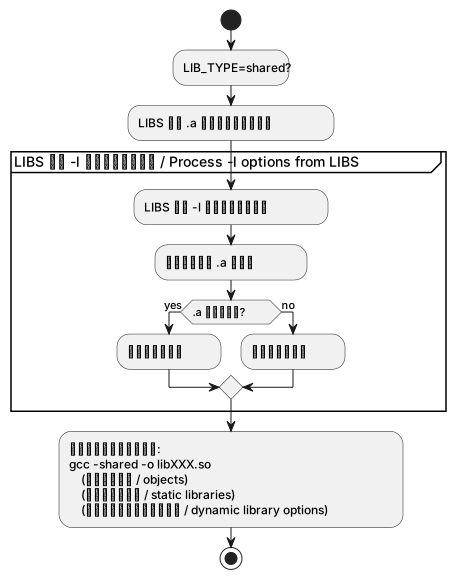
4 使用例 / Usage Examples
4.1 例1: LIBSDIR を使用 / Example 1: Using LIBSDIR
LIBSDIR = $(WORKSPACE_FOLDER)/prod/calc/lib
LIBS = -lcalcbase -lm
LIB_TYPE = shared
動作:
- libcalcbase.a が prod/calc/lib に存在 → 静的リンク
- -lm → 動的リンク
結果:
gcc -shared -o libcalc.so obj/*.o /path/to/libcalcbase.a -lmOperation:
- libcalcbase.a found in prod/calc/lib → static linking
- -lm → dynamic linking
4.2 例2: -L オプションを使用 / Example 2: Using -L option
LIBS = -L$(WORKSPACE_FOLDER)/test/lib -lcalcbase -lm
LIB_TYPE = shared
動作:
- libcalcbase.a が test/lib に存在 → 静的リンク
- -lm → 動的リンク
- -L オプションもリンクコマンドに渡される
結果:
gcc -shared -o libcalc.so obj/*.o /path/to/libcalcbase.a -lm -L/path/to/test/libOperation:
- libcalcbase.a found in test/lib → static linking
- -lm → dynamic linking
- -L option is also passed to link command
4.3 例3: 直接 .a を指定 / Example 3: Direct .a specification
LIBS = libcalcbase.a -lm
LIB_TYPE = shared
動作:
- libcalcbase.a を直接指定 → 静的リンク
- -lm → 動的リンク
結果:
gcc -shared -o libcalc.so obj/*.o libcalcbase.a -lmOperation:
- libcalcbase.a directly specified → static linking
- -lm → dynamic linking
4.4 例4: 混在パターン / Example 4: Mixed pattern
LIBS = libbase.a -L/custom/path -lcustom -lpthread -Wl,-rpath,/opt/lib
LIB_TYPE = shared
動作:
- libbase.a → 静的リンク(直接指定)
- -lcustom → /custom/path に .a があれば静的リンク、なければ動的リンク
- -lpthread → 動的リンク(通常 .so のみ存在)
- -Wl,-rpath,/opt/lib → リンクオプションとしてそのまま渡される
Operation:
- libbase.a → static linking (direct specification)
- -lcustom → static linking if .a exists in /custom/path, otherwise dynamic
- -lpthread → dynamic linking (usually only .so exists)
- -Wl,-rpath,/opt/lib → passed as-is
5 依存関係の自動更新 / Automatic Dependency Updates
静的ライブラリが更新された場合、共有ライブラリも自動的に再ビルドされます。
When a static library is updated, the shared library is automatically rebuilt.
例:
1. libcalcbase.a を変更
2. make を実行
3. libcalc.so が自動的に再ビルドされる
Example:
1. Modify libcalcbase.a
2. Run make
3. libcalc.so is automatically rebuilt
6 制限事項 / Limitations
6.1 1. 検索対象は .a のみ
.a ファイルのみを検索します。同名の .so と .a が存在する場合でも、.a が優先されます。
Only .a files are searched. Even if both .so and .a exist with the same name, .a is prioritized.
6.2 2. 検索パスの順序
最初に見つかった .a ファイルが使用されます。複数のパスに同名のライブラリがある場合は、検索パスの順序(LIBSDIR → -L → test/lib → システムパス)に注意してください。
The first found .a file is used. When multiple paths contain libraries with the same name, be aware of the search order (LIBSDIR → -L → test/lib → system paths).
6.3 3. アーキテクチャ依存パス
x86_64 Linux 用のシステムライブラリパス(/usr/lib/x86_64-linux-gnu など)がハードコードされています。他のアーキテクチャでは、makelibsrc.mk の ALL_LIB_DIRS に適切なパスを追加する必要があります。
System library paths for x86_64 Linux (/usr/lib/x86_64-linux-gnu, etc.) are hardcoded. For other architectures, appropriate paths must be added to ALL_LIB_DIRS in makelibsrc.mk.
6.4 4. LIB_TYPE=static には影響なし
この機能は LIB_TYPE=shared の場合のみ有効です。LIB_TYPE=static(デフォルト)の動作は変更されていません。
This feature is only active when LIB_TYPE=shared. The behavior of LIB_TYPE=static (default) is unchanged.
7 実装ファイル / Implementation File
ファイル: makefw/makefiles/makelibsrc.mk
変更行: 162-210行目(共有ライブラリビルドルール部分)
File: makefw/makefiles/makelibsrc.mk
Modified lines: Lines 162-210 (shared library build rules)
詳細な実装内容については、ソースコード内のコメントを参照してください。
For detailed implementation, refer to comments in the source code.
8 参考 / References
リンカーの挙動:
ldは.aファイルを直接指定すると静的リンクし、-lオプションは検索パスから.soまたは.aを探します依存関係管理: Make の自動依存関係解決機能により、静的ライブラリの更新を検知します
Linker behavior:
ldstatically links when.afiles are directly specified, while-loptions search for.soor.ain search pathsDependency management: Make’s automatic dependency resolution detects static library updates