GitHub Actions CI/CD 仕様
本プロジェクトでは GitHub Actions を使用した継続的インテグレーション (CI) とドキュメント生成を実装しています。
1 概要
main ブランチへの変更時に、Linux/Windows 両環境での自動ビルド・テスト、およびドキュメント生成を実行し、コード品質を維持します。
2 ワークフロー構成
2.1 ワークフローファイル
本プロジェクトでは統合ワークフローを使用しています:
.github/workflows/ci.yml- ビルド、テスト、ドキュメント生成、Pages デプロイの統合ワークフロー
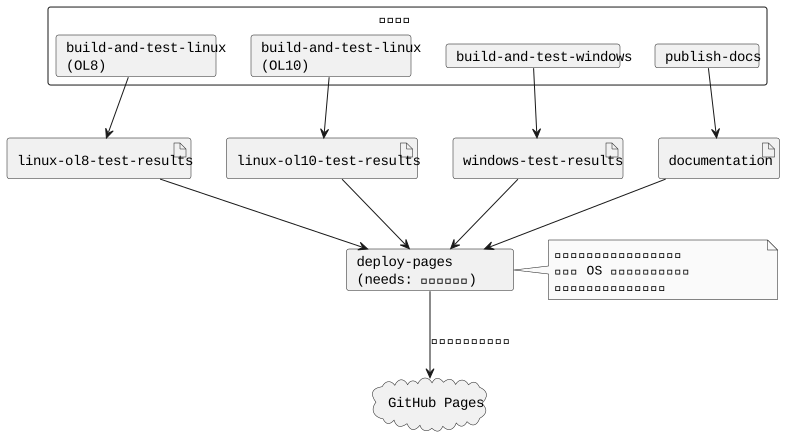
このワークフローには以下の 4 つのジョブが含まれています:
build-and-test-linux- Linux 環境でのビルドとテスト (Oracle Linux 8 / Oracle Linux 10 のマトリクス実行)build-and-test-windows- Windows 環境でのビルドとテストpublish-docs- ドキュメント生成deploy-pages- テスト結果とドキュメントの統合と GitHub Pages へのデプロイ
Linux ビルド (OL8/OL10)、Windows ビルド、ドキュメント生成のジョブが並列実行されます。すべて完了後に deploy-pages ジョブがテスト結果とドキュメントを統合して GitHub Pages にデプロイします。
2.2 トリガー条件
すべてのワークフローは以下のイベントで実行されます:
| イベント | 対象ブランチ |
|---|---|
| push | main |
| pull_request | main |
3 実行環境
3.1 Linux 環境
Linux 環境では Oracle Linux 開発コンテナをマトリクス戦略で使用し、複数バージョンでのビルドとテストを実行しています。
runs-on: ubuntu-latest
strategy:
  matrix:
    include:
      - os-name: ol8
        image: ghcr.io/hondarer/oracle-linux-container/oracle-linux-8-dev:latest
      - os-name: ol10
        image: ghcr.io/hondarer/oracle-linux-container/oracle-linux-10-dev:latest
container:
image: ${{ matrix.image }}| OS 名 | コンテナイメージ | 説明 |
|---|---|---|
| ol8 | ghcr.io/hondarer/oracle-linux-container/oracle-linux-8-dev:latest |
Oracle Linux 8 開発コンテナ |
| ol10 | ghcr.io/hondarer/oracle-linux-container/oracle-linux-10-dev:latest |
Oracle Linux 10 開発コンテナ |
これらのコンテナには以下の開発ツールが含まれています:
- C/C++ コンパイラ (GCC)
- GNU Make
- Google Test
- Doxygen, PlantUML, Pandoc
3.1.1 Linux 環境変数
| 変数名 | 値 | 説明 |
|---|---|---|
| HOST_USER | user | コンテナ内ユーザー名 |
| HOST_UID | 1001 | ユーザー ID |
| HOST_GID | 127 | グループ ID |
3.2 Windows 環境
Windows 環境では Windows Server 2025 ランナーを使用しています。
runs-on: windows-2025Windows 環境では以下のツールを動的にセットアップしています:
- OpenCppCoverage - C++ コードカバレッジツール (Chocolatey 経由でインストール)
- ReportGenerator - カバレッジレポート生成ツール (.NET ツール)
- MSVC 環境 - カスタムスクリプト (
Add-VSBT-Env-x64.ps1) で環境変数を設定
4 ジョブ実行フロー
5 実行ステップ
5.1 build-and-test-linux ジョブ
- リポジトリのチェックアウト
- サブモジュールを含めて再帰的にチェックアウト
- Git safe directory 設定
- コンテナ内での Git 操作を許可
- ビルド
makeを実行してプロジェクトをビルド- ビルドログを
logs/linux-build.logに保存
- テストの実行
make testを実行- testfw および test ディレクトリ配下のテストを実行
- テストログを
logs/linux-test.logに保存
- テスト結果アーティファクトのアップロード
- テスト結果 (
test/**/results/) を保存
- テスト結果 (
- ビルド&テストログアーティファクトのアップロード
- ビルドログとテストログ (
logs/) を保存
- ビルドログとテストログ (
5.2 build-and-test-windows ジョブ
- リポジトリのチェックアウト
- サブモジュールを含めて再帰的にチェックアウト
- OpenCppCoverage のインストール
- Chocolatey を使用してインストール
- PATH に追加
- ReportGenerator のインストール
- .NET Global Tool としてインストール
- MSVC 環境のセットアップ
- カスタムスクリプト (
Add-VSBT-Env-x64.ps1) で環境変数を設定
- カスタムスクリプト (
- ビルド
makeを実行してプロジェクトをビルド- ビルドログを
logs/windows-build.logに保存
- テストの実行
make testを実行- テストログを
logs/windows-test.logに保存
- テスト結果アーティファクトのアップロード
- テスト結果 (
test/**/results/) を保存
- テスト結果 (
- ビルド&テストログアーティファクトのアップロード
- ビルドログとテストログ (
logs/) を保存
- ビルドログとテストログ (
5.3 publish-docs ジョブ
このジョブは、build-and-test-linux および build-and-test-windows と並列に実行されます。
実行条件:
- 他のビルド&テストジョブと独立して並列実行されます
- CI 全体の実行時間を短縮し、効率的なリソース利用を実現します
処理フロー:
- リポジトリのチェックアウト
fetch-depth: 0で全履歴を取得 (Markdown 処理時の author/date 取得用)
- Git safe directory 設定
- コンテナ内での Git 操作を許可
- サブモジュール初期化
git submodule update --init --recursive --depth 1で浅いクローン
- ドキュメント生成
make doxy && make docsを実行- Doxygen および Pandoc でドキュメントを生成
- gh-pages 用アーティファクトアーカイブの作成
- main ブランチへの push 時のみ実行
- HTML と docx ファイルを zip 形式でアーカイブ
- GitHub Pages へのデプロイ
- main ブランチへの push 時のみ実行
- gh-pages ブランチに公開
- アーティファクトのアップロード
- HTML ドキュメント、docx ファイルを保存
5.4 deploy-pages ジョブ
このジョブは、上記のジョブ(build-and-test-linux (OL8/OL10)、build-and-test-windows、publish-docs)が並列実行され、すべて完了した後に実行されます。
実行条件:
- needs: [build-and-test-linux, build-and-test-windows, publish-docs] により、並列実行されたすべてのジョブが成功するまで待機
- if: github.ref == 'refs/heads/main' && github.event_name == 'push' により、main ブランチへの push 時のみ実行
処理フロー:
- アーティファクトのダウンロード
- Linux OL8 テスト結果アーティファクト (
linux-ol8-test-results) をダウンロード - Linux OL10 テスト結果アーティファクト (
linux-ol10-test-results) をダウンロード - Windows テスト結果アーティファクト (
windows-test-results) をダウンロード - ドキュメントアーティファクト (
documentation) をダウンロード - Linux OL8 ログアーティファクト (
linux-ol8-logs) をダウンロード - Linux OL10 ログアーティファクト (
linux-ol10-logs) をダウンロード - Windows ログアーティファクト (
windows-logs) をダウンロード
- Linux OL8 テスト結果アーティファクト (
- アーティファクトの整理と統合
- Linux OL8 テスト結果を
linux-ol8-test-results.zipにアーカイブ - Linux OL10 テスト結果を
linux-ol10-test-results.zipにアーカイブ - Windows テスト結果を
windows-test-results.zipにアーカイブ - Linux OL8 ビルド&テストログを
linux-ol8-logs.zipにアーカイブ - Linux OL10 ビルド&テストログを
linux-ol10-logs.zipにアーカイブ - Windows ビルド&テストログを
windows-logs.zipにアーカイブ - アーカイブを
docs/artifacts/に配置 - ドキュメントと統合
- Linux OL8 テスト結果を
- GitHub Pages へのデプロイ
- 統合された
docs/ディレクトリを gh-pages ブランチに公開
- 統合された
アーティファクトストレージの役割:
GitHub Actions のアーティファクトストレージを中継ストレージとして使用することで、異なる OS 環境(Linux、Windows)で生成されたファイルを 1 つのジョブに集約します。

6 GitHub Pages デプロイ
main ブランチへの push 時に、deploy-pages ジョブがドキュメントとテスト結果を統合して GitHub Pages に自動公開します。
6.1 使用アクション
- name: Deploy to gh-pages
  uses: peaceiris/actions-gh-pages@v4
  with:
    github_token: ${{ secrets.GITHUB_TOKEN }}
    publish_dir: ./docs
    force_orphan: true
6.2 設定詳細
| パラメータ | 値 | 説明 |
|---|---|---|
| publish_dir | ./docs |
公開するディレクトリ |
| force_orphan | true |
履歴なしの孤立ブランチとしてデプロイ |
6.3 デプロイ条件
- 実行される場合: main ブランチへの push
- 実行されない場合: Pull Request (PR のレビュー時はアーティファクトで確認)
6.4 Pages に配置される内容
deploy-pages ジョブにより、以下の内容が Pages に統合配置されます:
https://<username>.github.io/<repository>/
+-- doxygen/                          # Doxygen 生成 HTML
|   +-- index.html
+-- artifacts/
|   +-- docs-html-doxygen.zip         # HTML ドキュメントアーカイブ doxygen (固定 URL)
|   +-- docs-html-ja.zip              # HTML ドキュメントアーカイブ ja (固定 URL)
|   +-- docs-html-en.zip              # HTML ドキュメントアーカイブ en (固定 URL)
|   +-- docs-html-ja-details.zip      # HTML ドキュメントアーカイブ ja-details (固定 URL)
|   +-- docs-html-en-details.zip      # HTML ドキュメントアーカイブ en-details (固定 URL)
|   +-- docs-docx-ja.zip              # DOCX ドキュメントアーカイブ ja (固定 URL)
|   +-- docs-docx-en.zip              # DOCX ドキュメントアーカイブ en (固定 URL)
|   +-- docs-docx-ja-details.zip      # DOCX ドキュメントアーカイブ ja-details (固定 URL)
|   +-- docs-docx-en-details.zip      # DOCX ドキュメントアーカイブ en-details (固定 URL)
|   +-- linux-ol8-test-results.zip    # Linux OL8 テスト結果アーカイブ (固定 URL)
|   +-- linux-ol10-test-results.zip   # Linux OL10 テスト結果アーカイブ (固定 URL)
|   +-- windows-test-results.zip      # Windows テスト結果アーカイブ (固定 URL)
|   +-- linux-ol8-logs.zip            # Linux OL8 ビルド&テストログ (固定 URL)
|   +-- linux-ol10-logs.zip           # Linux OL10 ビルド&テストログ (固定 URL)
|   +-- windows-logs.zip              # Windows ビルド&テストログ (固定 URL)
+-- (その他の生成ドキュメント)
固定 URL の利点:
- テスト結果アーカイブは常に同じファイル名で配置されるため、固定 URL でアクセス可能
- ドキュメントへのリンクをハードコードしても、更新後も同じ URL でアクセスできる
6.5 GitHub リポジトリ設定
GitHub Pages を有効にするには、リポジトリ設定で以下を行います:
- Settings → Pages を開く
- Source で「Deploy from a branch」を選択
- Branch で「gh-pages」ブランチを選択
- フォルダは「/ (root)」を選択
- Save をクリック
公開後、https://<username>.github.io/<repository>/ でアクセス可能になります。
7 アーティファクト
CI 実行時に生成されるファイルをアーティファクトとして保存し、後から確認できます。
7.1 ジョブ間アーティファクト(中継用)
ジョブ間でファイルを受け渡すためのアーティファクトです。これらは deploy-pages ジョブで統合されます。
7.1.1 Linux テスト結果
マトリクス戦略により、OL8/OL10 それぞれのアーティファクトが生成されます。
- name: Upload test results artifacts
  uses: actions/upload-artifact@v4
  with:
    name: linux-${{ matrix.os-name }}-test-results
    path: test/**/results/
    if-no-files-found: warn
7.1.2 Windows テスト結果
- name: Upload test results artifacts
  uses: actions/upload-artifact@v4
  with:
    name: windows-test-results
    path: test/**/results/
    if-no-files-found: warn
7.1.3 ドキュメント
- name: Upload documentation artifacts
  uses: actions/upload-artifact@v4
  with:
    name: documentation
    path: docs/
    if-no-files-found: warn
含まれるファイル:
- docs/doxygen - Doxygen 生成 HTML
- docs/**/html - Pandoc 生成 HTML
- docs/artifacts/*.zip - ドキュメントアーカイブ
7.2 履歴管理用アーティファクト(コミット固有)
過去のビルドを参照するためのアーティファクトです。
7.2.1 HTML ドキュメント
言語ディレクトリごとに個別の artifact として保存されます (100MB 制限対策)。
- name: Upload html artifacts (doxygen)
  uses: actions/upload-artifact@v4
  with:
    name: ${{ github.event.repository.name }}-docs-html-doxygen-${{ github.sha }}
    path: docs/doxygen/
    if-no-files-found: warn

- name: Upload html artifacts (ja)
  uses: actions/upload-artifact@v4
  with:
    name: ${{ github.event.repository.name }}-docs-html-ja-${{ github.sha }}
    path: docs/ja/html/
    if-no-files-found: warn

- name: Upload html artifacts (en)
  uses: actions/upload-artifact@v4
  with:
    name: ${{ github.event.repository.name }}-docs-html-en-${{ github.sha }}
    path: docs/en/html/
    if-no-files-found: warn

- name: Upload html artifacts (ja-details)
  uses: actions/upload-artifact@v4
  with:
    name: ${{ github.event.repository.name }}-docs-html-ja-details-${{ github.sha }}
    path: docs/ja-details/html/
    if-no-files-found: warn

- name: Upload html artifacts (en-details)
  uses: actions/upload-artifact@v4
  with:
    name: ${{ github.event.repository.name }}-docs-html-en-details-${{ github.sha }}
    path: docs/en-details/html/
    if-no-files-found: warn
7.2.2 docx ドキュメント
言語ディレクトリごとに個別の artifact として保存されます (100MB 制限対策)。
- name: Upload docx artifacts (ja)
  uses: actions/upload-artifact@v4
  with:
    name: ${{ github.event.repository.name }}-docs-docx-ja-${{ github.sha }}
    path: docs/ja/docx/
    if-no-files-found: warn

- name: Upload docx artifacts (en)
  uses: actions/upload-artifact@v4
  with:
    name: ${{ github.event.repository.name }}-docs-docx-en-${{ github.sha }}
    path: docs/en/docx/
    if-no-files-found: warn

- name: Upload docx artifacts (ja-details)
  uses: actions/upload-artifact@v4
  with:
    name: ${{ github.event.repository.name }}-docs-docx-ja-details-${{ github.sha }}
    path: docs/ja-details/docx/
    if-no-files-found: warn

- name: Upload docx artifacts (en-details)
  uses: actions/upload-artifact@v4
  with:
    name: ${{ github.event.repository.name }}-docs-docx-en-details-${{ github.sha }}
    path: docs/en-details/docx/
    if-no-files-found: warn
7.3 アーティファクトの確認方法
- GitHub リポジトリの Actions タブを開く
- 対象のワークフロー実行を選択
- 「Artifacts」セクションからダウンロード
Pull Request 時はアーティファクトをダウンロードしてローカルでドキュメントやテスト結果を確認できます。
8 認証
GitHub Container Registry (ghcr.io) からのイメージ取得には GITHUB_TOKEN を使用します。
credentials:
  username: ${{ github.actor }}
  password: ${{ secrets.GITHUB_TOKEN }}
9 ローカルでの動作確認
CI と同等のビルドとテストをローカルで実行できます。
9.1 Linux 環境
make

make test

make doxy
make docs
9.2 Windows 環境
make

make test注意: Windows 環境では、事前に必要な環境設定を行う必要があります。詳細は CLAUDE.md の「Windows にてあらかじめ実施しなくてはいけない作業」を参照してください。
10 関連ドキュメント
- テストチュートリアル - テストの書き方
- ビルド設計 - makefile の構成
- Oracle Linux コンテナ - 開発コンテナの詳細