doxygen-colorize-output.sh 仕様
1 概要
doxygen-colorize-output.sh は、Doxygen の出力メッセージに ANSI カラーコードを適用し、エラーとワーニングを視覚的に区別しやすくするフィルタースクリプトです。
2 ファイルパス
doxygen-colorize-output.sh3 実行権限
実行可能 (chmod +x)
4 機能
標準入力から受け取った各行を解析し、エラーまたはワーニングメッセージを検出して着色します。
4.1 着色ルール
| メッセージタイプ | 検出パターン | ANSI カラーコード | 表示色 |
|---|---|---|---|
| エラー | error: |
\033[0;31m |
🔴 赤 |
| ワーニング | warning: |
\033[0;33m |
🟡 黄 |
| その他 | (該当なし) | (なし) | デフォルト |
5 実装詳細
5.1 ANSI カラーコード定義
RED='\033[0;31m'
YELLOW='\033[0;33m'
RESET='\033[0m'
5.2 処理フロー
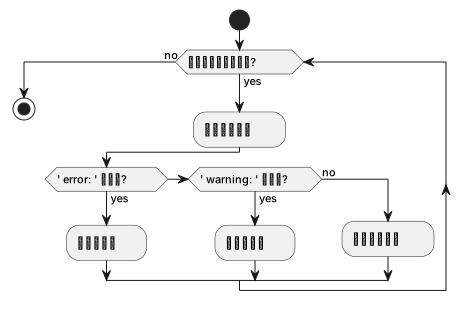
5.3 マッチング条件
5.3.1 エラーの検出
if [[ "$line" == *" error: "* ]]; then行内に error: (前後にスペースを含む) が含まれる場合にマッチします。
5.3.2 ワーニングの検出
elif [[ "$line" == *" warning: "* ]]; then行内に warning: (前後にスペースを含む) が含まれる場合にマッチします。
5.4 誤検知の防止
スペースを含むパターンマッチングにより、以下のような誤検知を防止します。
- 変数名:
show_error_flag,warning_count - 関数名:
print_error(),handle_warning() - コメント内の単語:
// This is an error example
6 使用方法
6.1 makefile からの呼び出し
doxygen Doxyfile 2>&1 | ../doxyfw/doxygen-colorize-output.sh2>&1: stderr を stdout にリダイレクトして結合|: パイプでフィルタースクリプトに渡す
6.2 終了コードの保持
doxygen Doxyfile 2>&1 | ../doxyfw/doxygen-colorize-output.sh;
DOXYGEN_EXIT=${PIPESTATUS[0]};
exit $DOXYGEN_EXIT;
PIPESTATUS[0] を使用して、パイプの最初のコマンド (doxygen) の終了コードを取得し、ビルドの成否を正しく判定します。
7 出力例
7.1 着色前
/path/to/file.c:42: warning: undocumented parameter 'foo'
/path/to/file.c:100: error: invalid syntax
Normal output line
7.2 着色後
(ターミナルでは以下のように表示されます)
/path/to/file.c:42: warning: undocumented parameter ‘foo’
/path/to/file.c:100: error: invalid syntax
Normal output line
8 制限事項
8.1 ANSI カラーコード非対応環境
Windows コマンドプロンプトなど、ANSI カラーコードに対応していないターミナルでは、エスケープシーケンスがそのまま表示される可能性があります。
8.2 ログファイルへの出力
ANSI カラーコードを含む出力をファイルにリダイレクトすると、エスケープシーケンスがそのまま記録されます。
ログファイルに保存する場合は、以下のいずれかの方法を推奨します。
- フィルターを適用せずに doxygen を直接実行
WARN_LOGFILE設定を使用して Doxygen が直接ログファイルに出力
9 テスト方法
以下のコマンドでスクリプト単体のテストが可能です。
cat <<'EOF' | doxygen-colorize-output.sh
Normal output line
/path/to/file.c:42: warning: undocumented parameter 'foo'
Another normal line
/path/to/file.c:100: error: invalid syntax
More normal output
EOF
期待される結果: warning 行が黄色、error 行が赤色で表示されます。
10 関連ファイル
makefile: 本スクリプトを doxygen 実行時に適用Doxyfile: Doxygen の警告フォーマット設定 (WARN_FORMAT)docs-src/doxygen-colored-output-research.md: 調査結果と背景情報